 |
| From http://d33v4339jhl8k0.cloudfront.net/docs/assets/530d5436e4b00af3a406927b/images/54189c85e4b099def9b55270/file-z5oDlK1ytC.png |
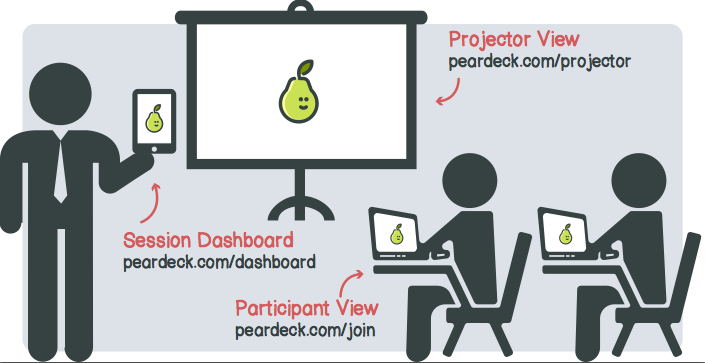
Pear Deck was an easy tool to insert into my lesson plans. Pear Deck allowed me to create slideshows, and easily add in photos, videos, and hyperlinks, similar to what I usually do when making directive lessons. These items can easily be seen and accessed by students, with the exception of videos which only play on the projector view.
 |
| You can easily input videos |
However, the deciding factor for this website was that it allowed me to insert interactive slides. These interactive slides could either be multiple-choice, text based, or number based questions, and if you have the premium account, draggable slides, or freehand drawings. All the answers to the questions are put up on the slideshow for everyone to see in real time, so students can see their peers opinions. This allows for a wide range of student responses, and a variety of ways to differentiate discussion questions. Another great aspect about this website is that all the students have the slides up on their technology, which decreases issues with students not being able to see the projector.
 |
| An example of a freehand drawing from https://s-media-cache-ak0.pinimg.com/736x/0f/a1/24/0fa124103f0df582f75d08a10222c53b.jpg |
One downside to Pear Deck is that the best features require a premium account. To get a premium account you either have to pay $30 a month ($12 as an educator), or take participate in a Pear Deck Professional Development session. That being said, I found Pear Deck still very useful using the free account. The biggest downside to Pear Deck is that for the best class participation, you would want to have a 1:1 ratio of students to technology. However, Pear Deck also seems to work well on mobile devices, so between all the personal devices and school devices available, and sharing devices between pairs, it usually works out well.
 |
| From http://d33v4339jhl8k0.cloudfront.net/docs/assets/530d5436e4b00af3a406927b/images/56a6669cc6979143615622e4/file-rRK2FvydBC.png |
In my lessons, I like to break up the content with discussion to ensure that content is being understood and to further learning or make connections. When asking for verbal discussion I found that I got very few responses, and it was very difficult to pull more opinions and thoughts out of the class. When using Pear Deck to instigate discussion, I would ask a question (as seen below) and would get far more responses. Students would then read each other's comments, and try to find unique answers.

 |
| Examples from my Grade 11 Ancient Civilization course, Fall 2016 |
From the discussion on the interactive slide, I would read a few comments and then have a verbal discussion based off their thoughts. After the above comments I asked the class, “What is better for society, a hereditary leader or an elected leader? Who would think that and why?”. Since conversation and ideas had already started, it was easier for students to jump in. They were now more confident in their own ideas because they had seen their peers’ ideas, and they had enough time to process the topic.
Another great aspect of having anonymous text responses instead of verbal discussion is that students were also being more creative with their responses. Through text, students felt much more comfortable bringing humor and making outside connections to the discussions we were having. In the photos below, you can see the variety of different ways students responded to the question. This helped create a more relaxed environment because students felt free to share their thoughts as they came, instead of feeling pressured that they had to say something that was “right” or “smart”.

 |
| Examples from my Grade 11 Ancient Civilization course, Fall 2016 |
After using Pear deck in my class, I found that it was a great tool for helping students engage with the material. With this class, I found that students were unwilling to share their thoughts verbally in discussions. Through interactive slides, students could build up confidence by interacting with the material through text and diagrams, and could check their content knowledge by observing their peers’ answers. Afterwards, students were much more likely to participate in verbal discussions, and then we could focus on furthering the learning by making connections. I would highly recommend Pear Deck, not as a substitute for PowerPoint presentations, but as a way to augment slideshows and discussions.


