Thursday, 23 March 2017

Engaging Students with Pear Deck

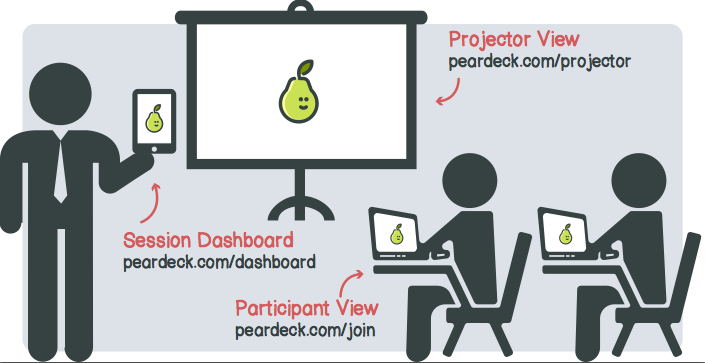
An issue I had while teaching history at the high school level was keeping students engaged. For the Grade 11 Ancient Civilization course I was teaching I found that most of their disengagement came from it being too early in the morning (the class was first period), and either not understanding the content or being afraid to give a wrong answer. Since this issues usually presented itself as a lack of verbal participation, I decided to try having the students participate through technology. The students in my class seemed very comfortable with using technology in the classroom, so I decided to try out Pear Deck as a means to have students participate in more class discussion. If you wish to try out Pear Deck you can find the link here, and if you wish to see how it works click the link here.

From http://d33v4339jhl8k0.cloudfront.net/docs/assets/530d5436e4b00af3a406927b/images/54189c85e4b099def9b55270/file-z5oDlK1ytC.png

Pear Deck was an easy tool to insert into my lesson plans. Pear Deck allowed me to create slideshows, and easily add in photos, videos, and hyperlinks, similar to what I usually do when making directive lessons. These items can easily be seen and accessed by students, with the exception of videos which only play on the projector view.

You can easily input videos

However, the deciding factor for this website was that it allowed me to insert interactive slides. These interactive slides could either be multiple-choice, text based, or number based questions, and if you have the premium account, draggable slides, or freehand drawings. All the answers to the questions are put up on the slideshow for everyone to see in real time, so students can see their peers opinions. This allows for a wide range of student responses, and a variety of ways to differentiate discussion questions. Another great aspect about this website is that all the students have the slides up on their technology, which decreases issues with students not being able to see the projector.

An example of a freehand drawing from https://s-media-cache-ak0.pinimg.com/736x/0f/a1/24/0fa124103f0df582f75d08a10222c53b.jpg

One downside to Pear Deck is that the best features require a premium account. To get a premium account you either have to pay $30 a month ($12 as an educator), or take participate in a Pear Deck Professional Development session. That being said, I found Pear Deck still very useful using the free account. The biggest downside to Pear Deck is that for the best class participation, you would want to have a 1:1 ratio of students to technology. However, Pear Deck also seems to work well on mobile devices, so between all the personal devices and school devices available, and sharing devices between pairs, it usually works out well.
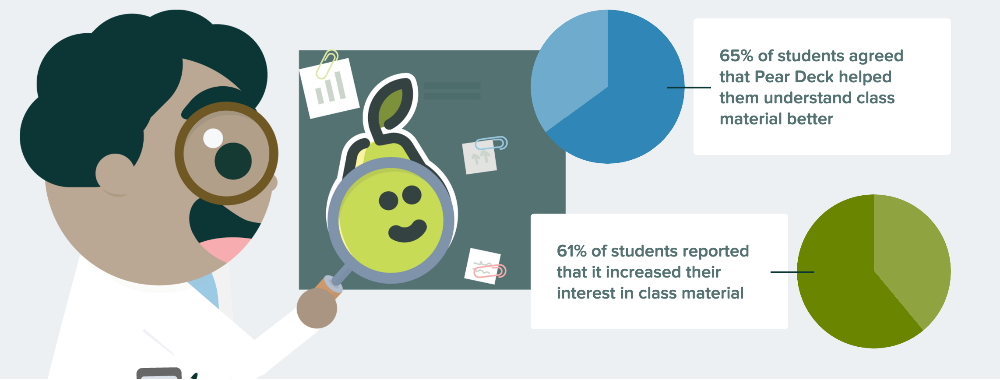
From http://d33v4339jhl8k0.cloudfront.net/docs/assets/530d5436e4b00af3a406927b/images/56a6669cc6979143615622e4/file-rRK2FvydBC.png

In my lessons, I like to break up the content with discussion to ensure that content is being understood and to further learning or make connections. When asking for verbal discussion I found that I got very few responses, and it was very difficult to pull more opinions and thoughts out of the class. When using Pear Deck to instigate discussion, I would ask a question (as seen below) and would get far more responses. Students would then read each other's comments, and try to find unique answers.

Examples from my Grade 11 Ancient Civilization course, Fall 2016

From the discussion on the interactive slide, I would read a few comments and then have a verbal discussion based off their thoughts. After the above comments I asked the class, “What is better for society, a hereditary leader or an elected leader? Who would think that and why?”. Since conversation and ideas had already started, it was easier for students to jump in. They were now more confident in their own ideas because they had seen their peers’ ideas, and they had enough time to process the topic.

Another great aspect of having anonymous text responses instead of verbal discussion is that students were also being more creative with their responses. Through text, students felt much more comfortable bringing humor and making outside connections to the discussions we were having. In the photos below, you can see the variety of different ways students responded to the question. This helped create a more relaxed environment because students felt free to share their thoughts as they came, instead of feeling pressured that they had to say something that was “right” or “smart”.

Examples from my Grade 11 Ancient Civilization course, Fall 2016

After using Pear deck in my class, I found that it was a great tool for helping students engage with the material. With this class, I found that students were unwilling to share their thoughts verbally in discussions. Through interactive slides, students could build up confidence by interacting with the material through text and diagrams, and could check their content knowledge by observing their peers’ answers. Afterwards, students were much more likely to participate in verbal discussions, and then we could focus on furthering the learning by making connections. I would highly recommend Pear Deck, not as a substitute for PowerPoint presentations, but as a way to augment slideshows and discussions.


Tuesday, 7 March 2017

Witch Hunt Simulator

During my practicum at Sir Robert Borden Secondary School, while teaching Grade 11 Ancient Civilizations, I wanted an interactive way to view witch hunts during the Medieval Era in Europe. While searching around the internet I managed to find an awesome (and free) website: A Witch Hunt: Germany 1628. This website is a simulation of how someone might have been questioned if they were suspected of being a witch. As you go through the website, you are presented with a narrative and options in how to respond, similar to a choose-your-own adventure book/website. This website portrays realistic scenarios and questioning that marginalized people went through during this period.

For my lesson, I started with an introduction of religious persecution during the Medieval Era, focusing on Spain and Germany. After some discussion on why religious persecution began, how it was implemented, and who was persecuted and why, we moved on to the witch hunt simulator activity. I gave students the time to explore the website at their own leisure. I gave my students enough time to get through at least 2 cycles of the website, because there were many different endings to the story. I followed this with a think-pair-share activity, where students discussed their results and thoughts of the website. Finally, I ended the class with a class discussion that summarized the reasons people may have been persecuted, and the end result for these marginalized people.

My students thoroughly enjoyed this activity. My students found this engaging because they could choose how their story progressed, as well as contained many torture devices and techniques that they found intriguing. A downside to this lesson was that it made the idea of torture “fun” because it was a game they wanted to win (ie. not die). It was hard to bring the conversation deeper to show the severity of the topic. In future, I would want the discussion at the end of class to bring the human element of the topic back in so students fully understand the real impact this had on people. Another downfall is that there is a lot of text to read. While most students read through the text because they found the topic interesting, students who are not as strong in reading comprehension might have a harder time. Depending on the class in the future, I may also offer a video to watch as an accommodation so students can receive the same content.  

Overall, I do think A Witch Hunt: Germany 1628 is a good resource to use in a history class. It is an interactive way to get students to read and research this topic as it is presented as a game. Students found the topic of torture intriguing, which is both a positive and a negative. I would recommend this resource to others, with the condition that they also include more human perspectives along with it.

My class working hard (but it's hardly work if it's fun right?)

Friday, 17 February 2017

Online Assessment and Feedback Tools

Today in my Integrating Technology in the Classroom course, our class created a collection of online resources that can be used for assessment and feedback. The collection talks about the uses of tools such as Google Classroom, EdPuzzle, Plickers, PearDeck, Kahoot, and much more.


Each slide examines how each tool can be used for both feedback and assessment. All of these examples have been used in classrooms by either myself or my classmates to improve how we collect and return assessment and feedback to students.


We thought that these resources were valuable to teachers so we wanted to share them with other educators. What online resources do you like to use? 


Monday, 13 February 2017

The Sparks of Learning

I watched Ramsey Musallam's TEDtalk 3 Rules to Spark Learning (find video here), and I found his thoughts on education really reflected my own. One line in particular really stood out: "Student questions are the seeds to real learning". I believe that this is true, that students should be the centre of their own learning. When we allow our students to water these seeds within our lessons and activities, we allow those seeds to grow and students will develop relevant knowledge.

Musallam talk about three different rules that best allow students to grow. The first rule is that curiosity comes first. When an environment is created where students want to ask questions, students will be more interested in the subject, which will lead to increased motivation. These questions are the sparks that lead to learning. Without these sparks, students can be disinterested, or fail to see the relevance of the material taught. Teachers must put fostering curiosity on the top of their priority list when creating lesson plans. However teachers cannot force these sparks. Students must find them on their own, and to do that students must have the space to explore.

The second rule is to embrace the mess. Musallam is referring to the process of trial and error, that exploration is often not straight-froward, and will often come with ups and downs in the process. However, in order for students to feel safe in making mistakes, teachers must provide an environment that is free of judgment. A space where mistakes are part of the process, not just something that happens when you're wrong. Creating this space can be difficult, but I believe that can be accomplished several different ways. First is that learning must be seen as growth. There is no "right" and "wrong" in learning, but instead learning is a process that takes time and continual development to improve. Next is that teachers must show students that everyone makes mistakes, even teachers. Teachers must not try to hind their inadequacies, or pretend that they are the holder of knowledge. By showing students that teachers can make mistakes it can bring comfort to the class, and helps build teacher-student relationships. Creating a space where students feel it is safe to make mistakes is crucial in fostering students' sparks. If students feel safe to pursue their questions, their sparks may create more sparks, or their sparks may grow into flames.

The third rule Musallam shares is that students should practice reflection. When students practice reflection, it gives students the space to have self guided learning. By reflecting on the past or present, students might learn how to improve their practices to receive better result next time. Students then become responsible for their own learning. When students are motivated to learn and reflect on their own, it greatly increases the chances for more sparks of learning.

Musallam's rules to spark learning are key to improving real and relevant learning for students. Focusing on curiosity with student-based inquiry and student-lead projects will help students foster intrinsic motivation, and will lead to real student growth.


Wednesday, 1 February 2017

Student Response Systems

Student Response Systems (SRS) take many different shapes and forms in the classroom. Most common are clickers, response cards, and game-based response systems. While looking at three different articles, Effectiveness of Student Response Systems (Cohn, Fraser, 2016), How to Improve Students Learning in Every Classroom Now (Twyman, Heward, 2016), and The Wear-Out Effect of a Game-Based Student Response System (Wang, 2015), I came to a couple different conclusions about SRS.

The first is SRS have a very positive effect on the classroom environment. Overall, they increased motivation to attend and participate in class, lead to increased academic achievement and lead to more on-task behaviour. SRS also has a positive effect for teachers as well. Teachers get immediate feedback on how many students understand the concepts in class, which can then either lead to deeper discussion or opportunities for teachers to expand on information to bridge gaps in learning.

The next point I observed is that students react very positively to SRS. Most students at the middle school level prefer response cards to raising their hands in class (Twyman, Heward, 2016). This means that more students are more likely to participate in class, and that they now have more opportunities to test out their knowledge for better understanding. SRS also allows all students the opportunity to respond to questions. This means students who tend to not participate in class have a better opportunity to do so. This also has benefits in bigger classes, because now all students can respond, instead of a small percentage of students. It was also found that classes that used SRS had better student attitudes about the class (Cohn, Fraser, 2016). 

The final observation that I made is that it is more important to use SRS properly, than what type of SRS is used. In order to keep student engagement, the questions used must be relevant. Without relevant questions, students fail to see the point of the activity. SRS also must be made relevant in the classroom. Using a SRS tool, like clickers or response cards, must be used for more than one or two questions in order for students to see the relevance in the tool. However, the opposite problem may occur from overusing a specific tool. If you use a specific tool too often, the novelty of the tool may wear down, and students might become bored of the activity (Wang, 2015). The key is to switch up which SRS you use in the classroom to maintain engagement. 

Overall, I believe SRS are a great way to engage the classroom. It gives equal opportunity for students to respond to questions, and gives both students and teachers immediate feedback on the students knowledge. Game-based SRS are great because you can turn student learning into a competition, which most students find entertaining. The trick is to make sure that whatever tool you use, that you make sure it is relevant and engaging. Not all tools will work well in every classroom, so try out a variety of different tool in different situations. My favourites so far are Kahoot and Peardeck, and while these depend heavily on technology, they bring a lot of fun and participation into the classroom. 

My sketchnote on my research of SRS


Sunday, 22 January 2017

iReal Pro in the Classroom

iReal Pro is an app that allows users to create backing tracks in various styles, or work with a backing track from a large selection of favourite songs. With this app you can slow down or repeat sections for practicing, create your own songs, learn how to play piano, guitar or ukulele, or create classroom playlists of exercises for students. A tutorial of how to work the app can be found here.   

This has huge benefits for music students. This can be a very useful tool for practicing. Teachers can either create an exercise for students to work with, or students can create their own track to fit their practice needs (to follow along with various scores, scales, or favourite songs). Students can slow down or repeat sections as needed, which is very useful, as it provides students with a resource that will keep the tempo and provide a good aural reference for tuning and pitching on the sections students are working on. This app also has huge creative potential. With this app, students can create chord progressions for original compositions. Students can easily play around with different chord combinations, and can instantly hear how the chords fit together as a whole. This also gives students the ability to make compositions individually and can perform them without need of others to play supporting instruments. The potential with this app seems to be endless.

I have used this app in my classroom to teach improvisation in senior jazz band. I created individual backing tracks for the chords Dm7, G7, and Cmaj7, which I used for the students to practice playing those chords arpeggiated. After the students were comfortable playing those arpeggios separately, I created a backing track of the same chords in a single progression, so the students could practice playing those arpeggios consecutively. From there, students then worked on playing various notes and patterns that followed the same pattern. I found iReal Pro was an excellent app to use both in class, and as a resources for students to practice on their own time. What the students liked most about the app was that we could change the tempo and style, so even though we played the same chord progression, they felt like they were playing something different. Overall, this app worked great in the classroom for what I was using it for.

The biggest downside to this app is the cost. For a Mac computer, it costs $19.99, which is not bad for a single download (link to app store here). The bigger concern is that the app for tablet or smartphone costs $12.99, and that is a lot to ask for every students to pay individually out of pocket. Luckily, I was able to purchase the app on a few school iPads using the Music Department Fund in order for students to practice with, but I would never ask students to use their own money to purchase this app. However, I would say that this app is worth the cost for music educators. iReal Pro has huge potential in the classroom, and as long as you have the resources in the classroom, can be used for all sorts of musical projects.

Wednesday, 18 January 2017

The Lion King Jr: Pros and Cons of Musical Theatre in Schools

From my experience working with The Lion King Jr. at Earl of March I have learned a lot of things, but it has also given me a chance to examine the pros and cons of working on a big musical theatre production. 

Some of the negative reasons are as follows. Putting on a play is a huge commitment. Teachers, or volunteers, have to put in a lot of hours working on lines, staging, creating and teaching choreography, teaching the choral and/or stage band music, creating the backdrops, and potentially creating costumes and props. As well, students need constant rehearsals in order to retain, or relearn, all the information needed for staging, choreography, lines, and music. There was never a point where every student remembered everything they learned the rehearsal before, because there was so much information being given at any given time. This means usually that there are many rehearsals before, during, or after school in order to go over everything.  The second point is that putting on a musical production can be expensive. You have to pay for the rights of the play, renting or buying the scripts, the materials for costumes and props, microphones for performers (or the batters that go into the microphones), making posters, programs, and tickets, and any other expense that may come up, like pizza and drinks during an extra long rehearsal. Some schools have budgeting for productions, but often schools have to fundraise, or students have to pay from their own pockets. After the high schools production of Legally Blonde, there was not much budget left for The Lion King Jr. Due to the lack of funding the school resorted to fundraising, which had it’s own issues. There were only so many days a year that students could sell food for fundraising, and the teachers were at a loss for what other kind of fundraisers students could do. Other than that instance, I am not sure how the school found the money for the play. I believe the teachers paid for the materials for the costumes out of their own pockets. In other school with fewer resources I could see this being an even bigger problem, especially when families cannot afford to pay extra money to be involved with extra-curriculars, and teachers do not want to invest their own money. Time and money are two huge factors that deter teachers from putting on a play because it can put a big strain on the community.

While time and money are primary issues for schools when putting on a musical production, there are also many positive reasons. Firstly, there are many wonderful teaching moments. Working on a play covers several expectations in the music, drama and even art curriculums. While not every student in these classes may be part of the production, you can still tie in different aspects into lessons that can make a student think deeper about the music they are learning in their extra-curriculars.  It is always good to make connections in class to outside activities because it contextualizes the information they are learning, keeps them engaged, and gives them a chance for higher thinking. Another positive aspect of musical theatre is that directors can allow students to explore their own creativity. There is room to try out different creative ideas while acting, and often input from students can be given for opinions like phrasing and sometimes even staging. When making connections from different lessons, students can feel like their voices mattes to the development of the play, and allows them to validate the concepts they have been learning in class. Next, putting on a big production gives students opportunities to increase their social skills. Students put many hours of rehearsal and practice to get ready for their final performances, which givens them lots of time to interact with other students involved with the production. While learning as a group, students can also bond over the experiences they have shared, creating deeper connections. Finally, after the performances, students will feel very proud of the final product that they have created. This kind of experience shows friends and families how hard the students have worked, and can create intrinsic motivation within the students, which will hopefully encourage them to take part in more artistic productions. While the cons may strain the community, it is clear to see that the pros of musical theatre all benefit the growth of the students.

Deciding whether or not to take on the challenge of putting on a school theatre production can be difficult, but what it really comes down to is resources. What can your school provide finically? Is there the correct space to put on a big production? Do you have enough support with volunteers, whether it be teachers, parents, or community members, in order to run a big event? Can you handle the extra workload on top of your other responsibilities? If so, then consider putting on a school production. The benefits for students are overwhelmingly great.